Nexus Review: EdTech Updates July 2026

Introduction
A few of our core tools (Peerceptiv, VoiceThread, and Respondus) have introduced updates focused on two common challenges: verifying authentic student work and reducing grading effort in larger courses.
Below is a quick overview to help you plan for these new changes.
Peerceptiv: New Integrity Center
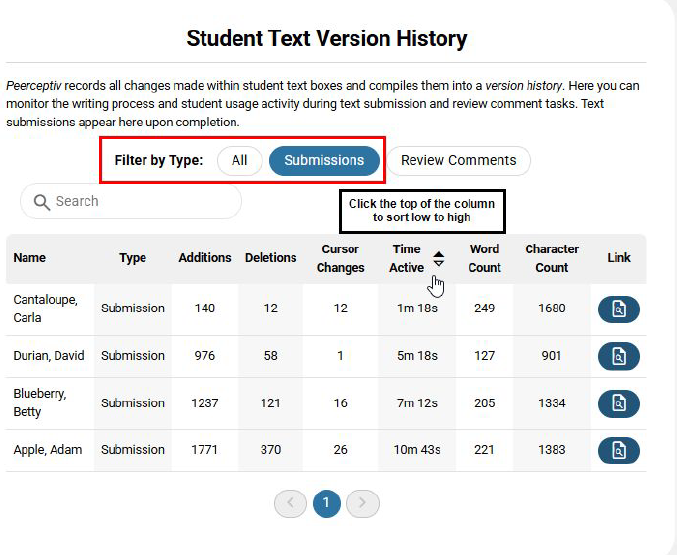
Peerceptiv is introducing a set of Integrity Safeguards designed to give more visibility into how students are writing, not just what they submit.
You can now limit copy/paste in submissions and reviews, encouraging students to write directly in the platform.
A new Integrity Center dashboard highlights writing behaviors like time on task, edits, and deletions. If something feels off, you can also review a playback of the student’s writing process over time.


A helpful pattern to watch for: longer submissions with very little writing activity or revision history.
One important reminder: while Peerceptiv is making available student usage data, these features are best used to guide conversations with students about their process and not for formal conduct decisions.
VoiceThread: More Structured Participation
VoiceThread now supports more intentional sequencing of student work.
You can require students to submit their own content before viewing or responding to peers. This can help balance participation and reduce “early influence” in discussions.

Rubrics can also now be built directly in VoiceThread and synced with the gradebook, making feedback and grading more consistent.

“Beginning July 21st, VT is launching an integrated screen recording feature. You'll be able to record your screen right in the browser. No separate app. No extension to install. Capture a walkthrough, a worked problem, a live editing session, anything you'd normally have to record somewhere else and then import. If you want students to show their thinking, VoiceThread's multimodal commenting + screen recording lets you see that thinking explicitly. No AI detection required.”
If you are using VoiceThread this term, it may be worth pointing students to the updated student guides as the interface has been refreshed.
Respondus: More Control Over Flagging

Respondus Monitor has added a few features that make proctoring reports easier to interpret.
You can now adjust sensitivity levels depending on your exam setup. For example, a relaxed setting may make more sense for open-note or applied assessments.
There is also an option to require a second camera for a side view of the testing environment, and students can submit photos of handwritten work at the end of an exam.
One note: advanced integrations with tools like Word and Excel are still limited on Chromebooks and iPads.
To learn more about using these tools in your course, feel free to contact the Nexus team at nexus@nyu.edu
References
Disclaimer: This post was drafted with AI and reviewed and edited by the Nexus team as part of our ongoing exploration of AI-supported workflows.


Comments